





Since launching L2 DataMapping in 2022 L2 users have experienced scores of enhancements and improvements to their experience in working with L2 data. One of the biggest ongoing improvements has been speed. L2 has undertaken this resource deletion update to automatically remove old “resources ” to make the platform as efficient and fast as possible.
Resources refer to any input you, the user, make in L2 DataMapping, including:
- Universes
- Shapes
- Reports
- Private Branches
- Exports
- Matching Jobs
Instead of just deleting these resources, we allow you to see which resources are queued for deletion and when. If necessary, you can prevent the deletion or restore resources yourself.
It’s important to note that this does NOT affect purchases. When you buy data, you have one year or 365 days from the date of purchase to download it and update the system.
What are these new dots on the screen?
When you log in, you will notice new dots in the system. These are color-coded to help you easily identify when you have resources that are going to expire and when.
Applications with deleted resources will have a status icon in the top right corner. This represents the total number of deleted resources. The color represents the soonest purge date. For example, below, the United States Consumers application has 2 deleted resources, at least one of which will be permanently deleted (purged) within the next 10 days. The Pennsylvania Voters application has 1 deleted resource to be purged between 10 and 30 days from now. And the Connecticut Voters application has 1 deleted resource to be deleted beyond 30 days from now.

Hovering over the icon reveals these details.
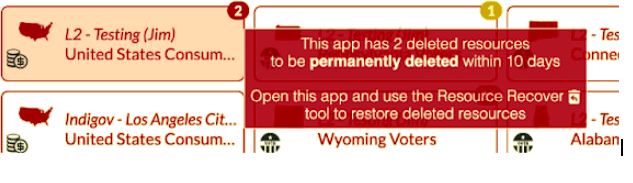
The dot coloring timeline is as follows:
- Red: Ten Days or Fewer
- Yellow: Ten to 30 Days
- Green: 30 Days+
Email Notifications of Deletions
Users with at least one resource scheduled for permanent deletion within the next 30 days will receive a notification email once a week. The notification will include details about the types of resources to be purged, the application in which they reside, and the number of days until they are permanently deleted. These details are broken down into the three deleted resource categories based on how soon they will be permanently deleted.
Links within the tables lead to the appropriate Data Mapping Application, where users can use the new Resource Recovery tool to recover the deleted resources they wish to keep.
The following is an example notification email.

Deletion Status Bar in Applications
A new status component has been added to the information area in the top right of the application:
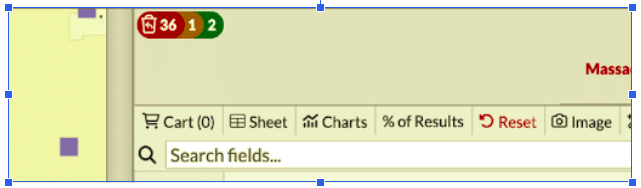
This component (
Hovering over the individual status colors reveals their description.


Resource Recovery Tool – How do I save my stuff from being deleted?
Users can open the Resource Recovery tool by clicking on the new status component (
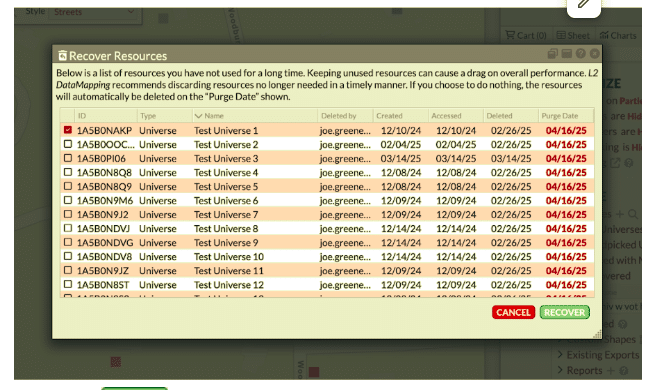
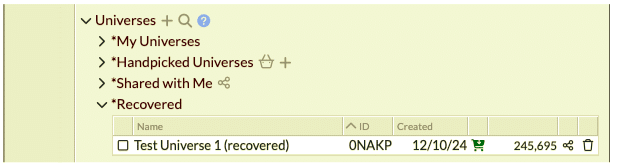
After clicking RECOVER, resources will appear back in their respective areas. Recovered universes will be moved to the *Recovered folder. When Universes, Shapes, and Private Branches are recovered, “(recovered)” is added to the end of the resource’s name.
For any questions on this please email support@L2-data.com or contact us via the chat on our homepage – www.L2-data.com